
Farsight is a personal finance app for recording everyday income and spending, whether for one person or a whole family, by typing, snapping a receipt, or saying one sentence out loud. Every screen carries a full Windows XP look, from the Bliss wallpaper and blue title bars to the taskbar and classic message boxes. Entries are saved on the device first and synced automatically to a spreadsheet in the owner's own Google account, and the whole app runs at zero cost per month.
A scrollable look at the finished site, exactly as a visitor would browse it.
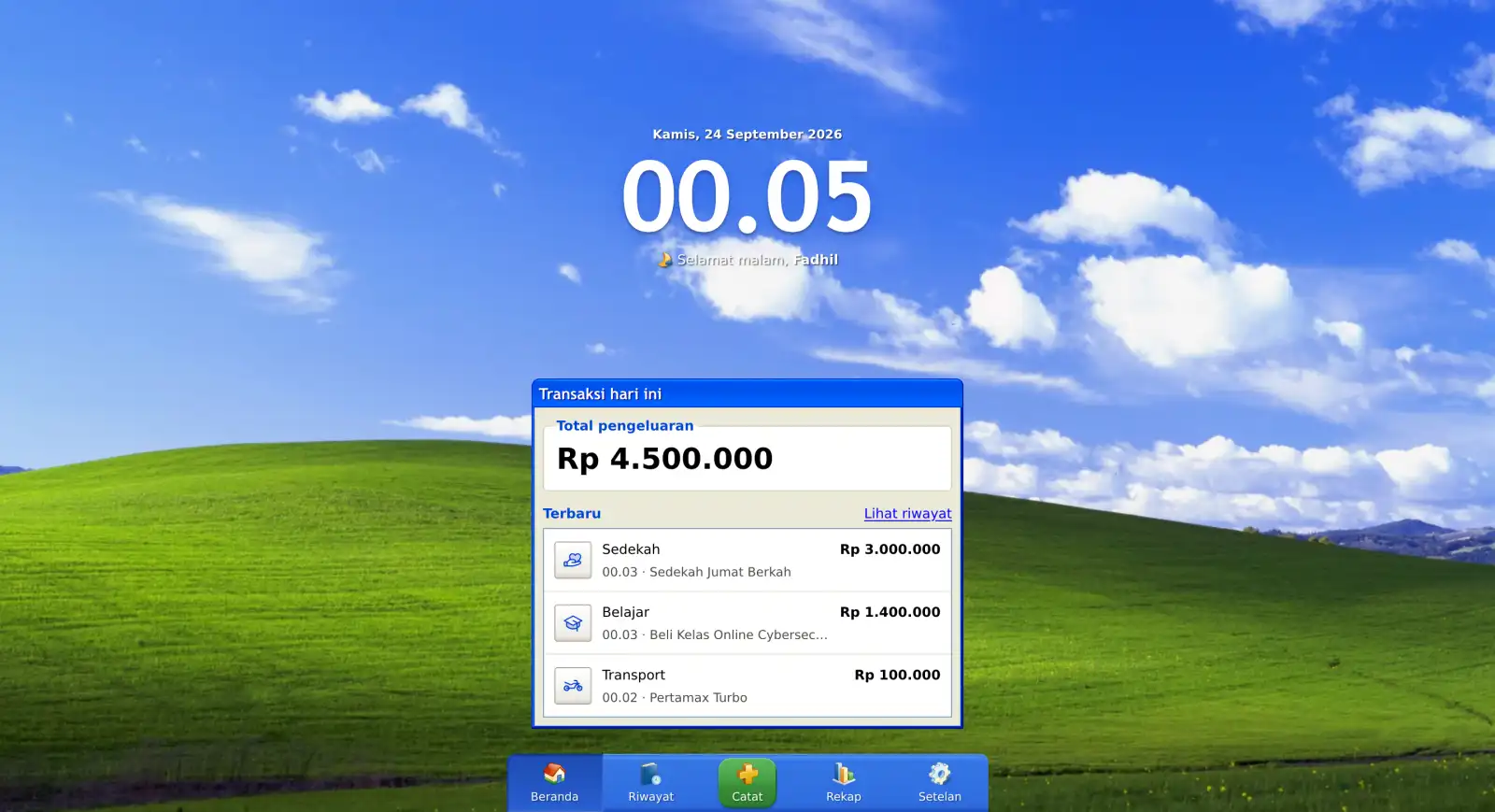
Desktop
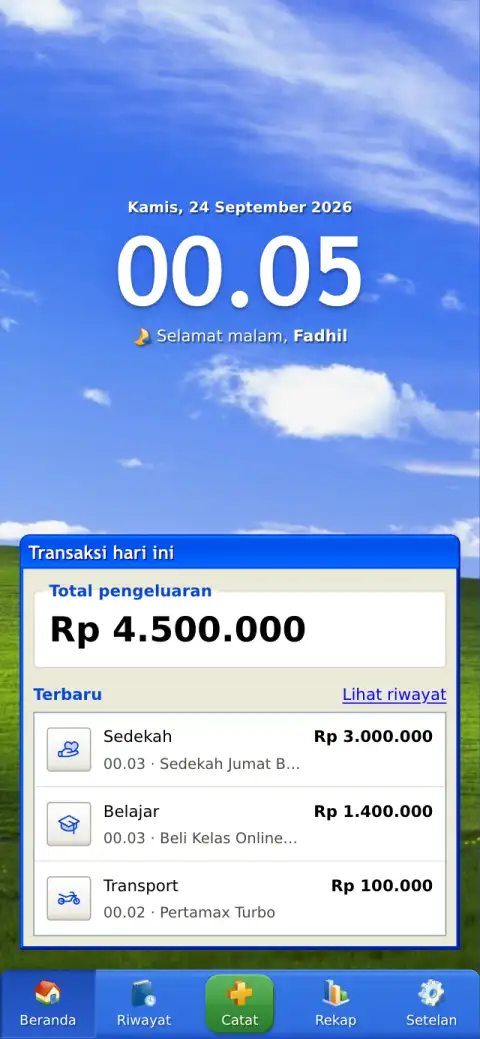
Mobile
Work like this is usually split between a developer, a UI/UX designer, and a graphic designer. On this project, one person holds all three of those skill sets, so every decision came from someone who understood the whole project, not just their own part of it.
12
standards met, from code to design.
Business impact here is measured across 5 areas: Presence, Quality, Trust, Conversion and Growth. Together they cover how the business is found, perceived, and acted on.
A clear view of every day, month, and year
Before
Without a consistent record, it is hard to see where money goes each day, month, or year, and spending is usually noticed only after it has added up.
After
Today's spending sits right on the home screen, while history and yearly and monthly recaps show where the money went, broken down by category.
Each project draws on a mix of disciplines: here's how they came together on this one.
The tools and technologies that came together to bring this project to life.









The problems that came up while building this project, and what came out of solving them.
Speech Recognition That Doesn't Work Everywhere
The browser's built-in speech recognition is blocked inside the installed app on iPhone and never responds on some older Android phones, solved by recording audio at the same time and sending it for transcription only when the browser returns nothing, with unresponsive devices remembered so they skip straight to recording.
Small Vision Models Misreading Receipt Layouts
Asking the AI to pick the total directly often returned the wrong number, so the model now only copies the receipt text line by line, and the total, store, and date are chosen by fixed rules in code that can be tested.
Keeping Offline Entries Safe Until They Sync
Entries made without internet had to survive until the connection returned, handled by saving everything on the device first and syncing automatically, with local changes always winning over pulled data and only one sync running at a time, even across tabs.
Rows Shifting Into the Wrong Column
Adding rows through the standard append call once guessed the table wrong and shifted data into column B, fixed by inserting each new row directly below the last ID and writing to an exact column range.
Learning TanStack Start on a Real Project
This was the first project on TanStack Start, and some behavior wasn't obvious, like nested routes needing a parent file or they silently show Not Found without the type check catching it.
Dates Differing Between Server and Device
The server runs on UTC, so a date calculated during server rendering could differ from the device's date near midnight, solved by always reading today's date on the device.
Gaps Below the Taskbar in the iPhone App
On iOS 26 with a translucent status bar, the installed app calculated the screen height too short and read the bottom safe area as zero, leaving a blank strip under the taskbar, fixed by sizing the app to the large viewport height and calculating the home indicator space on the device.
The technical problems fixed while building this project.
Entries kept safe until they sync
Owner-only, server-side access
3 to 8 MB photos down to a few hundred KB
At most about 500 KB on a phone's first load
Testable, rule-based receipt parsing
The same XP scrollbar on every device
Before
An app that writes straight to a remote spreadsheet loses any entry made without internet, and a failed request can silently drop data.
After
Every change is written to IndexedDB first with a pending status, then synced automatically on load, on reconnect, when the app returns to view, and two seconds after each change. A failed sync is retried at the next chance, and Web Locks keep only one sync running across tabs.
Before
Calling Google APIs or the AI binding from client code would expose OAuth tokens and let anyone spend the free AI allowance.
After
Every Sheets and Workers AI call runs through TanStack Start server functions that check the owner's session first, and server-only code lives in files the framework refuses to bundle for the browser. Google access is also limited to the drive.file scope, so the app can only touch files it created.
Before
Sending full-size phone photos wastes upload time and makes faint thermal receipts harder for the model to read.
After
Photos are redrawn on a canvas in the browser, capped at 1200px and converted to high-contrast grayscale JPEG, turning 3 to 8 MB camera photos into a few hundred kilobytes and stripping location metadata before anything is sent.
Before
Loading one oversized wallpaper on every screen, full font files, and a chart library adds weight that slows the app down on a phone.
After
Phones load only a portrait wallpaper while tablets and desktops get a 2560px landscape one, the self-hosted DejaVu Sans font is trimmed from 476 KB to 49 KB, code is split per route, and charts are drawn with plain SVG and CSS instead of a chart library.
Before
Letting a small model pick the total directly made mistakes hard to trace and impossible to test.
After
The model only transcribes the receipt, and fixed rules in code pick the total, store name, and date, with a clear label priority from Grand Total down to cash paid. The logic can be tested and adjusted, and text printed on a receipt can't take over what gets saved, since every result still passes those rules and the owner's review.
Before
iOS Safari and Chrome on Android ignore the scrollbar styling that xp.css relies on, so scrollable areas lost their XP look on phones.
After
A custom scrollbar recreates the XP track, thumb, and arrows on every device, with XP behavior like arrows that keep scrolling while held, tapping the track to page, and a draggable thumb. The thumb position is written straight to the DOM in requestAnimationFrame, so scrolling stays smooth.
